How to make a tax invoice with this invoice generator
Fill five things and the invoice is ready to print. Step 1: under Your Business (Seller), enter your name, GSTIN, address and Your State. Step 2: under Bill To (Buyer), enter the buyer’s name, GSTIN if they are registered, address and Place of supply (buyer’s State). Step 3: set the Invoice No. and Date. Step 4: on each line, enter the item description, HSN, quantity, unit, rate and GST %. Step 5: press Print / save as PDF. An example line is filled in on load.
Tax invoice format: what Rule 46 requires
A GST tax invoice must carry the particulars listed in Rule 46 of the CGST Rules, 2017. The table maps each clause to its box here; write a delivery address or reverse-charge note in the buyer address or Notes / Terms. Text: CGST Rules, Rule 46.
| Rule 46 | Particular | In this invoice generator |
|---|---|---|
| (a) | Supplier name, address and GSTIN | Your Business (Seller) |
| (b) | Serial number, up to 16 characters, unique for the financial year | Invoice No. |
| (c) | Date of issue | Date |
| (d) | Registered recipient: name, address, GSTIN or UIN | Bill To (Buyer) |
| (e), (f) | Unregistered recipient, ₹50,000 or more (below that, on request): name, address, delivery address, State and its code | Bill To (Buyer) address and Place of supply; the tool prompts at ₹50,000 |
| (g) | HSN code | HSN, on each line |
| (h) | Description | Item description |
| (i) | Quantity and unit | Qty and unit |
| (j) | Total value of supply | Grand Total |
| (k) | Taxable value after discount | Subtotal |
| (l) | Rate of tax | GST %, printed as CGST and SGST or IGST |
| (m) | Amount of tax | CGST, SGST or IGST lines |
| (n) | Place of supply with the State name, inter-State | Place of supply (buyer’s State) |
| (o) | Delivery address, if different | Buyer address or Notes / Terms |
| (p) | Whether tax is on reverse charge | Notes / Terms |
| (q) | Signature of the supplier | Authorized Signature line |
| (r) | QR code with IRN (e-invoicing) | Not made here: see the e-invoicing guide |
GST bill format: CGST and SGST or IGST, with an example
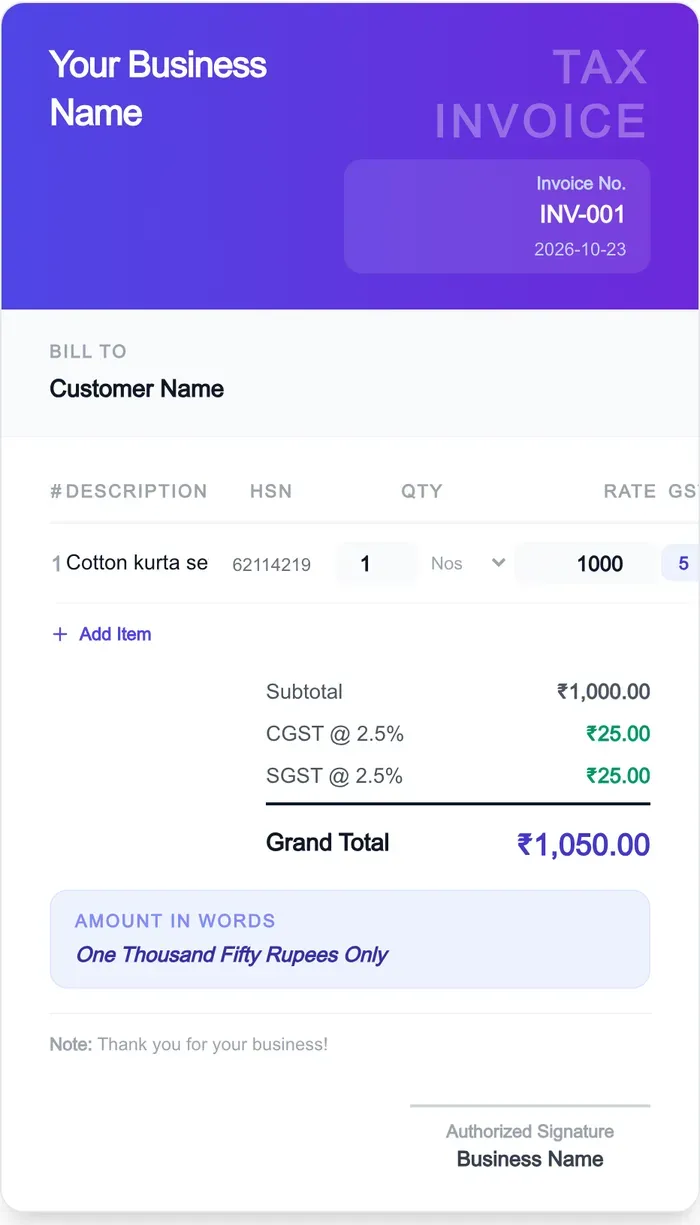
Within one State the GST rate splits in half as CGST and SGST; to a buyer in another State the full rate is charged as IGST. Rule 46(n) wants the State’s name on an inter-State invoice; the Place of supply box prints it. Example: 1 cotton kurta set, HSN 62114219, ₹1,000 at 5%. In your State that is CGST ₹25 + SGST ₹25 = ₹1,050; to another State, IGST ₹50 = ₹1,050. The rate is 5% because garments up to ₹2,500 a piece pay 5% (PIB, 56th GST Council). The GST % list offers 0, 3, 5, 18 and 40, the rates in force since 22 Sept 2025 (3% is jewellery).
| Sale | Taxable value | CGST | SGST | IGST | Total |
|---|---|---|---|---|---|
| Cotton kurta set, same State | ₹1,000 | ₹25 (2.5%) | ₹25 (2.5%) | — | ₹1,050 |
| Cotton kurta set, another State | ₹1,000 | — | — | ₹50 (5%) | ₹1,050 |
The example invoice as the generator prints it
HSN code on an invoice: 4 or 6 digits
HSN is required on GST tax invoices: 4 digits if your aggregate turnover in the previous financial year was up to ₹5 crore, 6 digits above ₹5 crore, with effect from 1 April 2021 under Notification 78/2020-Central Tax, dated 15 Oct 2020. Up to ₹5 crore the code is optional only on B2C invoices to unregistered buyers. Find yours with the HSN code finder or the HSN code list; for clothes, GST on clothes gives the rate per piece.
Invoice number format: 16 characters, unique each year
Rule 46(b) asks for a consecutive serial number of up to 16 characters, unique for a financial year, using letters, numerals, the hyphen "-" and the slash "/", in one or multiple series (CBIC, read 23 Oct 2026). A year prefix keeps the series readable: 26-27/001 is 9 characters. Multiple series are allowed, so a shop counter and a marketplace account can each run their own prefix. The Invoice No. box checks the length and the characters as you type.
Invoice format without GST: bill of supply
An invoice without GST is a bill of supply, issued under section 31(3)(c) and laid out by Rule 49: supplier name, address and GSTIN; a serial number of up to 16 characters, unique for the financial year; the date; the registered recipient’s name, address and GSTIN or UIN; HSN; description; value of supply after discount; and a signature. Rule 49 lists no rate of tax and no tax amount (CGST Rules, Rule 49, read 23 Oct 2026). This generator prints a TAX INVOICE; set GST % to 0 only for a nil-rated supply. It is free, needs no signup, and nothing is uploaded. Checked by the StitchMagic team, 23 Oct 2026. StitchMagic is a set of free tools and one AI listing agent (ListMagic) for online sellers in India that helps them list faster on Meesho, Flipkart and Amazon.in and sell more.