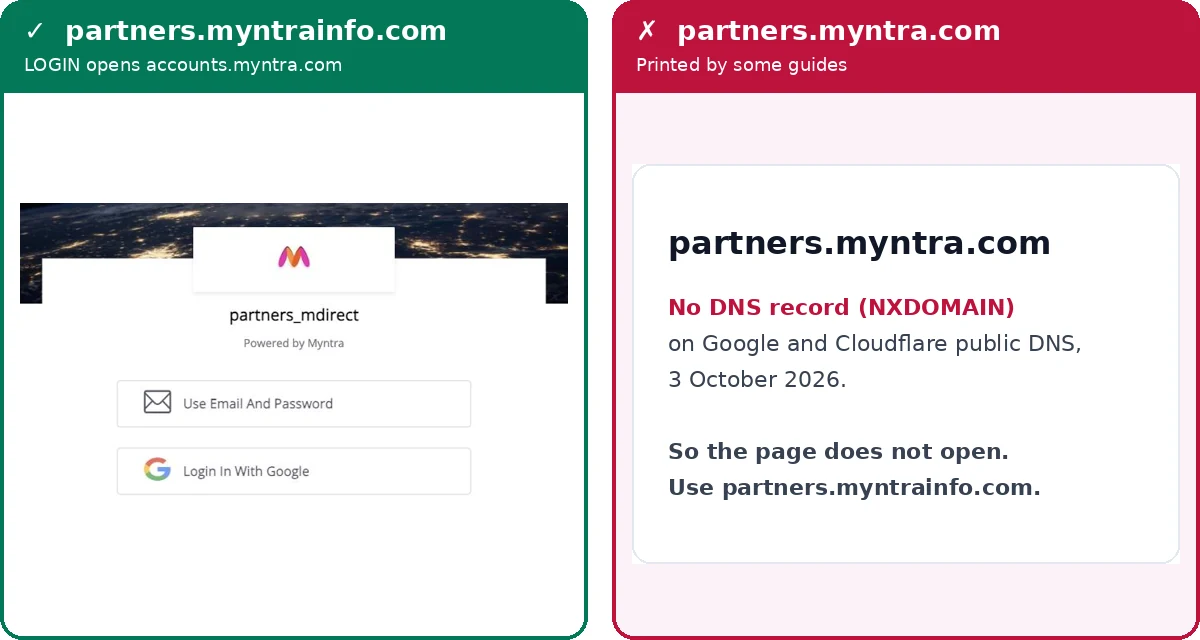
Before you start: no onboarding, no Myntra login
Anyone can apply at partners.myntrainfo.com/Register, but sign-in only works after Myntra selects and onboards the brand. A correct password on an account that is still in review will not get you in. Myntra’s own FAQ on the portal (checked 3–4 October 2026) says:
- Documents: PAN card, GSTN certificate, cancelled cheque, authorised signatory signature copy, and the original trademark certificate or an authorisation letter / NOC on the brand owner’s letterhead.
- Time: onboarding within 15 business days if the brand qualifies, and longer during major sale events, up to 45 days.
Already onboarded? You need the email your seller application was made with, and a browser: Myntra’s Google Play developer page lists no seller app, only the Myntra shopping app (checked 11 October 2026). Documents, fees and payouts are on our Myntra seller hub.
How to log in to the Myntra partner portal
Three steps; the second surprises people. Screens as we saw them on 4 October 2026, with numbered boxes.
- 1
Open partners.myntrainfo.com and press LOGIN
Go to partners.myntrainfo.com — myntrainfo, not myntra — and press LOGIN at the top right (box 1). REGISTER, next to it, is the application form for new sellers.
You should see: a page titled “Partner at Myntra-Jabong” with LOGIN and REGISTER in the header.

The partner portal header, 4 October 2026. 1: LOGIN. - 2
Let the address change to accounts.myntra.com, then pick a sign-in option
The portal has no login form of its own. It sends you to accounts.myntra.com, which shows “partners_mdirect” and “Powered by Myntra”. A domain change mid-login looks like phishing, so check the address bar reads exactly accounts.myntra.com. Then choose “Use Email And Password” (box 1) or “Login In With Google” (box 2).
You should see: two buttons and nothing else on the page.
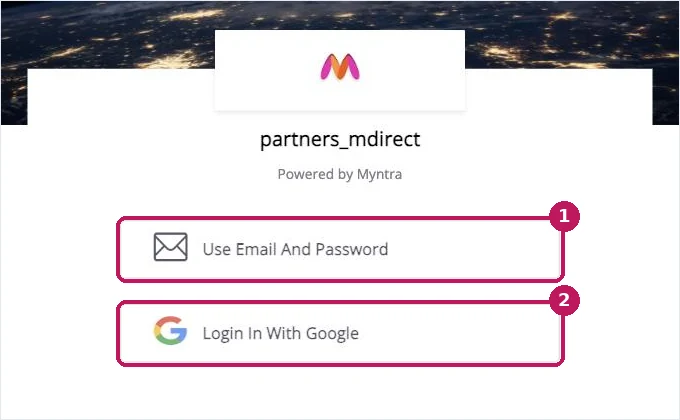
Myntra’s sign-in page for partners, 4 October 2026. 1: email and password · 2: Google. - 3
Enter your registered email and password, then press LOG IN
On the email option the page asks for Email (box 1) and Password (box 2), with a Show Password tick-box. Use the email the seller application was made with; a personal email belonging to the same person is a different account. If you registered with a Google account, go back and use Google instead. Forgot the password? Forgot Password sits under LOG IN (box 3).
You should see: you return to partners.myntrainfo.com — the sign-in link is set to send you to its Dashboard page.
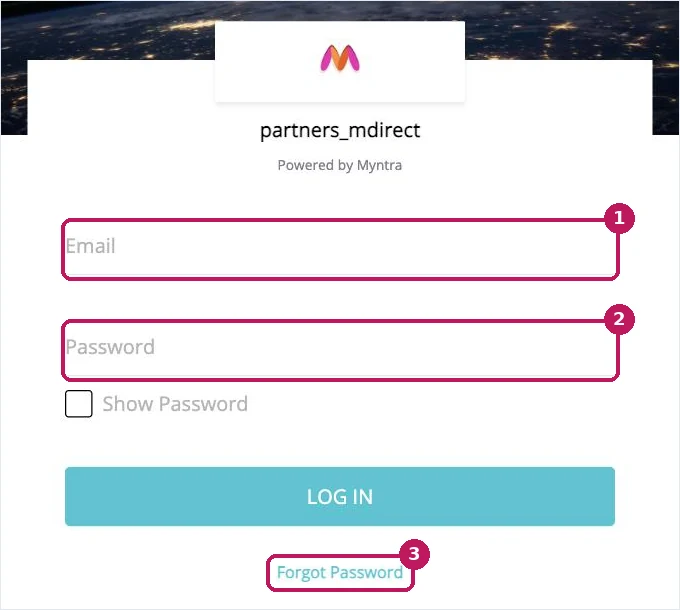
The email sign-in form, 4 October 2026. 1: email · 2: password · 3: Forgot Password.
Myntra Jabong and mDirect seller login: which address works
Only partners.myntrainfo.com, or partnerportal.myntra.com which redirects to it, reached the seller sign-in in our test. Myntra runs its partner systems on a separate domain, myntrainfo.com, which is why the partners.myntra.com address some guides print goes nowhere. Of the ten guides we read for this search on 3 October 2026, two named partners.myntra.com and only four gave any login address at all.
| Address | What it is | Status, 3 Oct 2026 |
|---|---|---|
| partners.myntrainfo.com | The partner portal; LOGIN and REGISTER start here | Use it |
| accounts.myntra.com | Myntra’s sign-in page that LOGIN opens | Expected step |
| partnerportal.myntra.com | Redirects to partners.myntrainfo.com | Works, via redirect |
| mmip.myntrainfo.com | Marketplace APIs, linked from the portal footer | Not the seller login |
| mdirect.myntrainfo.com | Listed in search results as a login; “partners_mdirect” is only the label on the sign-in page | “Not found” (10 Oct 2026) |
| partners.myntra.com | Named as the portal by some guides | No DNS record |
| partner.myntra.com · seller.myntra.com · brands.myntra.com | Guesses by analogy with other marketplaces | No DNS record |
| seller-university.myntra.com | Still appears in search results | No DNS record |
Loaded from a browser in India on 3 October 2026; mdirect.myntrainfo.com fetched on 10 October 2026. “No DNS record” = NXDOMAIN on both Google (dns.google) and Cloudflare public DNS that day; the same addresses also failed our 23 August 2026 check.
If an address in the red rows fails to open, it is not your account or your internet: there is nothing at that address.
Myntra Jabong seller login
The Myntra Jabong seller login is the same partner portal, partners.myntrainfo.com: its title reads “Partner at Myntra-Jabong - One place for all your interactions with Myntra and Jabong” (loaded 3 October 2026). There is no second Jabong portal to find; press LOGIN there and follow the three steps above.
Myntra mDirect seller login
“mDirect” is the label on Myntra’s partner sign-in page, not a separate site. The page that LOGIN opens on accounts.myntra.com shows “partners_mdirect”, while mdirect.myntrainfo.com itself returned “Not found” when we fetched it on 10 October 2026. Start at partners.myntrainfo.com and the mDirect sign-in comes up as step 2.
Myntra seller login problems and fixes
Most of these are not password problems, which is why resetting the password rarely helps.
| What you see | Usually means | Fix |
|---|---|---|
| The page will not open at all | You are on partners.myntra.com or another address with no DNS record | Go to partners.myntrainfo.com |
| You landed on the shopping site | You signed in from myntra.com, not the portal; accounts.myntra.com serves both | Start at partners.myntrainfo.com and press LOGIN |
| Sign-in keeps looping back | Often an old session in the browser | Clear cookies for myntra.com, or try a private window |
| Password not accepted | Your registered email may be a Google account | Try “Login In With Google” before resetting |
| Registered, but nothing works | Onboarding is not finished | See “Before you start”; a reset will not fix this |
Fake “Myntra” calls and fees
“Myntra does not charge any onboarding fee or refundable deposit from sellers.”
The portal notice (checked 3–4 October 2026) also says not to accept email from addresses without @myntra.com, and warns about people posing as Myntra staff to ask for money or personal details.
The one charge that does exist is a one-time growth enablement charge for new sellers once they start operating, netted off against payouts and given back as product listing ad credits of the same value. We found no seller phone number or support form on the partner portal pages we could read; once onboarded, Partner University covers Myntra’s processes and policies.
What the Myntra seller panel gives you after login
The portal lists these seller services (checked 3–4 October 2026): Partner Insights (real-time data with a reporting dashboard), Partner University (Myntra’s processes and policies through videos and courses), the Myntra Ads Platform (Product List Ads, Display Ads, Search Banners and M-Live), Myntra Studio, a free order management system and Marketplace APIs. Myntra’s FAQ gives a 15-day payment settlement cycle from the date of delivery; the Myntra seller calculator shows what an order leaves you after fees.
Registration, the brand rule and the documents Myntra asks for are on our Myntra seller hub. Selling on Meesho as well? The Meesho seller login guide covers that panel, and marketplace seller tools lists the rest.
मिंत्रा सेलर लॉगइन: हिंदी में
मिंत्रा का सेलर पोर्टल है partners.myntrainfo.com — myntrainfo, myntra नहीं। partners.myntra.com का कोई DNS रिकॉर्ड नहीं है, इसलिए वह नहीं खुलता।
लॉगइन: पोर्टल पर LOGIN दबाएँ। पेज accounts.myntra.com पर जाएगा — यह सामान्य है। वहाँ ईमेल-पासवर्ड या Google से लॉगइन करें।
लॉगइन नहीं हो रहा? अकाउंट अभी ऑनबोर्ड नहीं हुआ है तो सही पासवर्ड भी काम नहीं करेगा। मिंत्रा कोई ऑनबोर्डिंग फ़ीस या डिपॉज़िट नहीं लेता। (जाँच: 4 October 2026)