Online catalogue maker: product photos to a catalog you share as one link
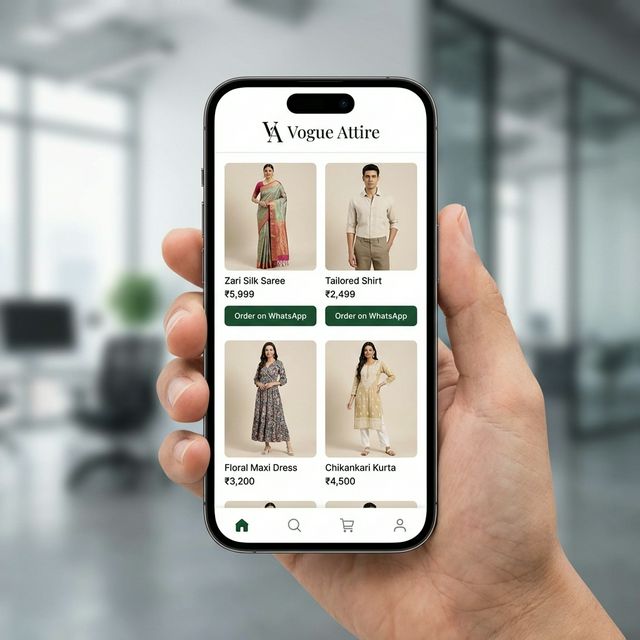
Upload product photos, let the AI make clean catalogue images and draft the details, add your prices, pick a layout and publish. The digital catalog is a web page that opens on any phone, so you send one link on WhatsApp or Instagram instead of a stack of photos.
Made for clothing, fabric, jewellery and other products sold by Indian sellers. It does not make PDFs.
The builder opens in your StitchMagic dashboard after sign-in. AI images and AI-written details use credits.
How to make a digital catalog online
- Upload product photos. Up to 20 at a time. A back view or a close-up per product helps the AI keep details right.
- Make images and details. Choose the image types you need; Generate Details drafts the title, description, category and tags.
- Price and organise. Enter the price, an optional discount (the sale price is worked out for you) and the stock status.
- Publish and share. Add your WhatsApp number to your profile, publish, and copy the catalog link.
Online catalogue design: layouts by seller type
The catalog page comes in ready layouts matched to what you sell, from a plain grid to category cards first for large ranges.
| Seller type | Layouts |
|---|---|
| Fashion and boutiques | Fashion Grid, Minimalist, Lookbook, Sidebar Categories, Top Navigation, Category Landing |
| Fabric sellers | Fabric List, Fabric Catalog, Minimal Fabric, Fabric Type Categories, Fabric Deals, Category Landing |
| Jewellery, home decor and other products | Product Grid, Catalog View, Showcase, Sidebar Categories, Top Navigation, Category Landing |
AI catalogue maker: images and sizes
For clothing the AI can make a model try-on shot, a white-background shot, a lifestyle background, a colour variant and a close-up of the work. AI images can drift from the real product, so compare each one with the piece in hand before you publish. Download images in these presets:
| Size preset | Output |
|---|---|
| Original HD | 1800 px |
| Meesho | 1000 × 1000 px |
| Flipkart | 1000 × 1000 px |
| Amazon | 2000 × 2000 px |
| 1080 × 1350 px | |
| 1080 × 1080 px |
Source: StitchMagic catalogue builder presets and layouts, checked 18 Oct 2026. These are our presets, not marketplace rules; check each marketplace's own image guidelines.
Catalog maker by product type
The same builder sits behind each of these; the pages cover what to shoot and which images to make for that product.
Catalog maker FAQ
Is this online catalogue maker free?
Not fully. You need a StitchMagic account, and each AI image or AI-written product detail uses credits from it; your balance and top-ups are in the dashboard.
Can I download the catalog as a PDF?
No. The catalog is a web page you share as a link. You can download the product images themselves, one by one or as a ZIP, in the size presets above.
Does the AI catalogue maker write product descriptions?
Yes. Generate Details drafts a title, description, category and tags from each photo. Read and edit them before you publish; the price is always yours to enter.
How many products can I add at once?
Up to 20 photos per upload, and you can keep adding more. Files over 25 MB are skipped.
How do buyers contact me from the catalog?
Publishing asks for your WhatsApp number. Each design on the catalog page has a button that opens a WhatsApp chat with you, with a ready message that carries a link to that design’s image.
Your whole range, one link.
Selling these products on Meesho too?
ListMagic is our listing agent for the Meesho Supplier Panel: it drafts each listing’s title, category, attributes and price from a product photo, and you check it before submitting. Free plan to start; Seller Pass ₹99 a month (StitchMagic pricing, checked 16 Oct 2026).
Try ListMagic