Meesho label crop with invoice: 4×6 label cropper
By StitchMagic team · Last checked 30 October 2026
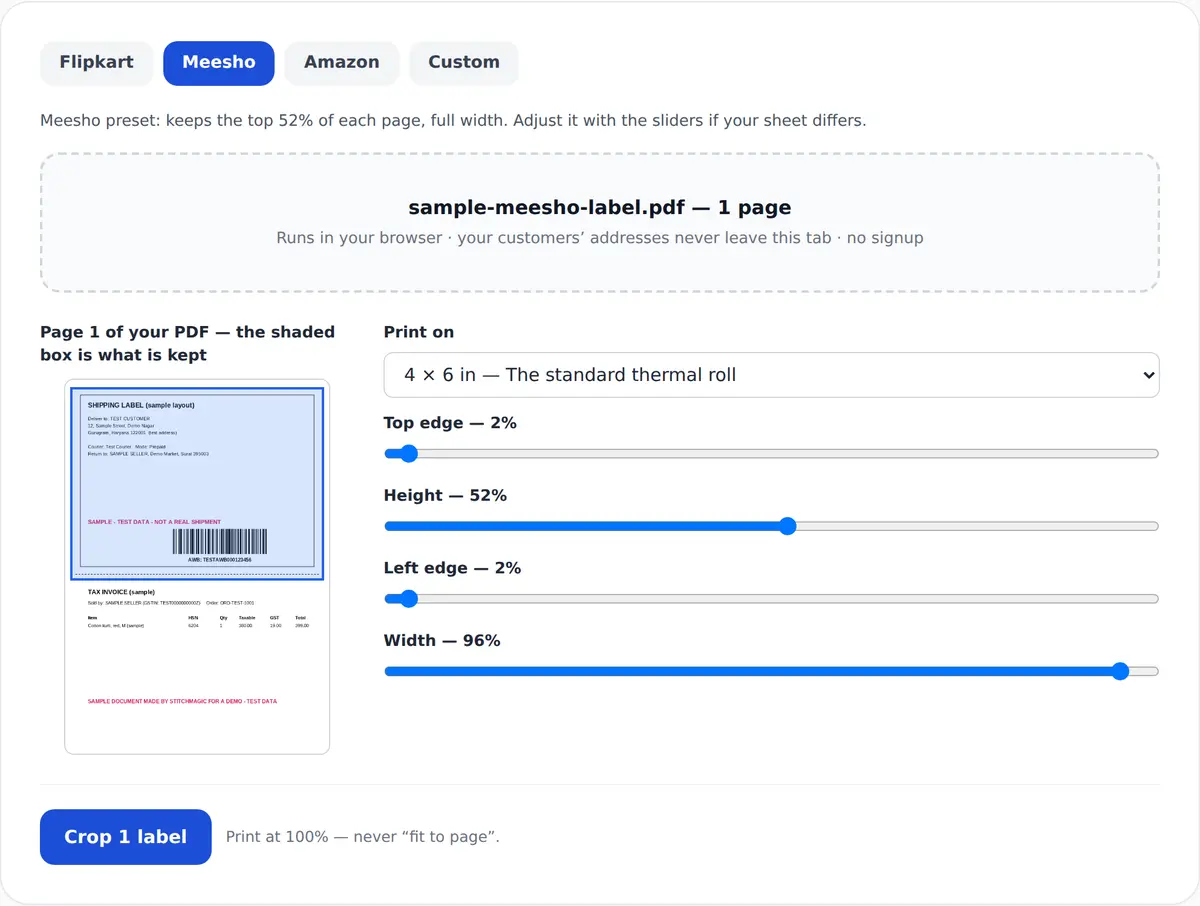
Meesho preset: keeps the top 52% of each page, full width. Adjust it with the sliders if your sheet differs.
Drop your Meesho label PDF here, or click to choose it
Runs in your browser · your customers’ addresses never leave this tab · no signup
What the crop does
Meesho label crop: the A4 sheet in, a 4 × 6 in label out
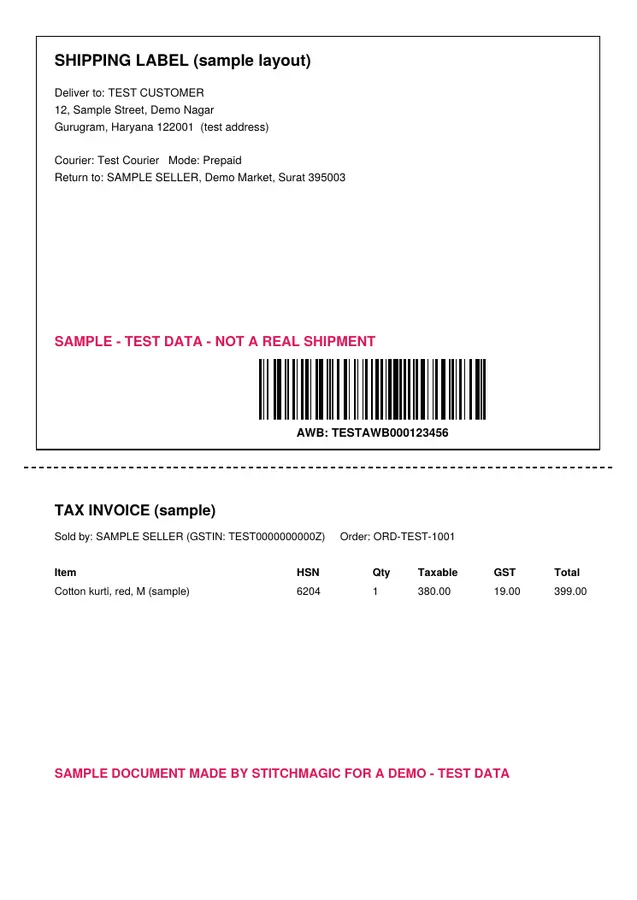
A4 sheet: label + invoice (sample)
Sample A4 label we made with test data, in the Meesho layout: label on top, invoice below. Not a real Meesho label.
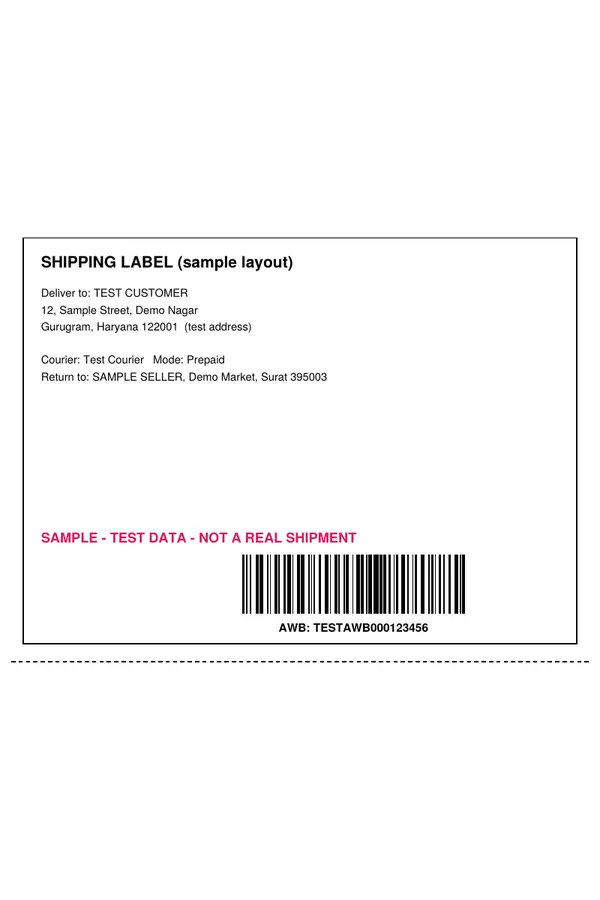
4 × 6 in label only
Real output of our cropper on that sample: the label part only, on a 4 × 6 in page.
Before the 11 AM cut-off
How to use the Meesho label cropper
- 1
Download the labels
In the Supplier Panel open Orders, then the Ready to ship tab, and download the labels for the orders you are packing. - 2
Drop the PDF in
Page one appears with the Meesho window shaded over the part that will be kept. - 3
Check the window
The barcode and the whole address block must sit inside the box. If the last line is cut, raise the Height slider. - 4
Crop and print
Leave the output at 4 × 6 in and press Crop; one window covers every page. Print at 100% and print the manifest before the pickup agent arrives.
Source for the Ready to ship tab, the 11 AM cut-off and the manifest: Meesho learning hub, retrieved 4 Oct 2026. Lost in the panel? The Supplier Panel guide maps it.
Meesho label crop 4×6: what the cropper keeps
| Item | Value | Source |
|---|---|---|
| Output label (default) | 4 × 6 in = 101.6 × 152.4 mm | Tool output menu; inch-to-mm arithmetic |
| Default Meesho crop window | 52% of the page height from just below the top edge, almost full width; adjustable | Tool default (StitchMagic code), not a Meesho specification |
| A6 sheet (not the same as 4 × 6 in) | 105 × 148 mm: 3.4 mm wider and 4.4 mm shorter | ISO 216 A6; arithmetic |
| What the Meesho PDF holds | A seller guide says: shipping label above, tax invoice below. Not yet confirmed on a real Meesho sheet | Third-party seller guide, retrieved 4 Oct 2026 |
| Print scale | 100% / actual size | StitchMagic print instruction |
Source: StitchMagic tool code, checked 16 Oct 2026; seller guide retrieved 4 Oct 2026. If your sheet looks different, the page-one preview shows it before you crop. Cropping Flipkart labels instead? The Flipkart label crop uses a shorter default window for Flipkart’s sheet.
Meesho label crop with invoice, on thermal or A4
Meesho invoice crop: a second pass
The Meesho preset crops the label only. To get the tax invoice as well, drop the same PDF in again, pick Custom, move the Top edge slider down to where the label ends and raise Height to cover the invoice, then pick A5 or “Keep cropped size” and press Crop. You get two PDFs: labels for the thermal printer, invoices for plain paper.
Keep the original PDF with the day’s orders too; it is the record your accountant will ask for.
Printing on thermal or A4
- Thermal: load 4 × 6 in labels (101.6 × 152.4 mm), set the same paper size in the print dialog, print at 100%.
- Home printer: pick A5 in the output menu, or keep 4 × 6 in on plain A4 paper, at 100% either way.
- Cut, don’t fold: a fold across the barcode can stop it scanning. Tape the label flat on the bag.
Output sizes: the tool’s output menu, checked 16 Oct 2026. Crop your Meesho labels ↑
Meesho label crop problems and fixes
The last line of the address is cut off
You used the Flipkart window on a Meesho file
The label prints small or the barcode won’t scan
One label spreads over two stickers
Pickup comes a day late
Labels in the PDF don’t match the parcels on the table
Cut-off and Ready to ship tab: Meesho learning hub, retrieved 4 Oct 2026. Windows: StitchMagic tool defaults.
Free, private, and what the crop changes
Free
Nothing uploaded
Cut and resize only
Original untouched
Next catalog to list on Meesho?
Related seller tools
Frequently asked questions
How do I use the Meesho label cropper?
Download the labels from the Ready to ship tab, drop the PDF into the tool, check the window on page one, and press Crop. Print the result at 100%.
Can I crop a Meesho label with the invoice?
Yes, in two passes. Crop the labels with the Meesho preset, then drop the same PDF in again, pick Custom, move the Top edge slider below the label and crop the invoice part. Your original PDF is not changed, so the full invoice pages are still there too.
What size is a Meesho label after cropping?
4 × 6 inches, which is 101.6 × 152.4 mm. 100 × 150 mm, A5 and “keep cropped size” are also in the output menu, and the crop window stays the same whichever you pick.
Meesho label ko 4x6 mein kaise crop kare?
Ready to ship tab se label PDF download karein, tool mein daalein, page one par dekhein ki barcode aur address box ke andar hain, phir 4 × 6 in chunkar Crop dabayein. Print 100% scale par karein.
When should I download Meesho labels for same-day pickup?
Before 11 AM, as Meesho’s learning hub states. Print the manifest from the Ready to ship tab before the pickup agent arrives.
Are my customers’ addresses uploaded anywhere?
No. The PDF is opened, cropped and saved inside your browser tab and is never sent to a server.
Official sources: Meesho: how to package and process orders (Ready to ship tab) · Meesho: common mistakes (11 AM label cut-off, manifest). Both retrieved 4 Oct 2026.