WhatsApp catalogue maker: product photos and one link to share
Upload your product photos, turn them into clean catalogue images, add a price to each, and publish. You get one catalogue link to send in any WhatsApp chat, group or status, and buyers message you from it.
It is not a WhatsApp catalogue downloader and it does not make PDFs. It also does not fill the catalog inside the WhatsApp Business app; you can share the catalogue link from there instead.
The builder opens in your StitchMagic dashboard after sign-in, in a phone or desktop browser. AI images and AI-written details use credits.
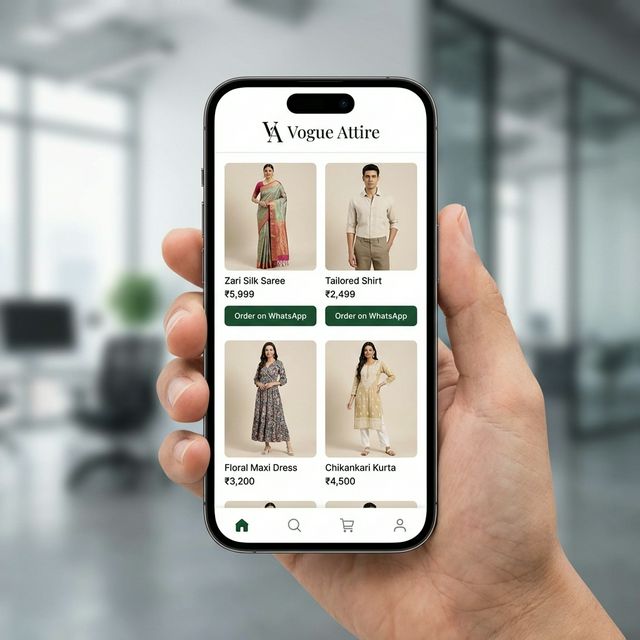
Create a catalogue on WhatsApp in three steps
- Upload product photos. Drop up to 20 at a time, in daylight and with the whole product in frame. Add a back view or close-up if you have one.
- Make the images and details. Pick the image types you need below. Generate Details drafts a title, description, category and tags from each photo; you add the price, and an optional discount works out the sale price.
- Publish and share. Add your WhatsApp number to your profile (publishing asks for it), publish, and copy the catalogue link into WhatsApp.
Check every AI image against the real product before you publish, especially colour and print, and redo any that do not match.
WhatsApp catalogue design: images, sizes and layouts
For clothing, each product can carry several of these images, so one kurta can have a model shot, a white-background shot and a close-up of the work.
- AI model try-onYour garment on a model, in the pose and background you pick.
- White backgroundThe product on a plain white background with a soft shadow.
- Lifestyle backgroundThe product placed in a styled setting, kept sharp and in front.
- Colour variantThe same design in another colour, for pieces you stock in several shades.
- Product close-upA detail shot of the border, print or embroidery.
Download the images resized with the WhatsApp preset (1080 × 1080 px) or the Instagram preset (1080 × 1350 px), one by one or as a ZIP. The catalogue page itself comes in layouts such as a product grid, a lookbook, or category cards first, picked to suit fashion, fabric or general products.
Source: StitchMagic catalogue builder presets and layouts, checked 18 Oct 2026. These are our presets, not WhatsApp rules.
WhatsApp Business catalog vs a catalogue link
Catalog in the WhatsApp Business app
WhatsApp’s own feature: you add items one by one in the app, and buyers browse them inside your WhatsApp profile. StitchMagic does not upload to it, so there is no bulk upload from here into that catalog. WhatsApp’s Help Center has the current steps and limits.
StitchMagic catalogue link
A web page with all your products, made from photos in bulk. It opens in any phone browser, so you can send it in chats and groups, post it in a status, or post it on Instagram.
WhatsApp catalogue kaise banaye
Apne products ki photos upload kijiye, har photo se catalogue image banaiye, price daliye aur publish kar dijiye. Publish karne ke liye profile mein WhatsApp number hona zaroori hai. Phir ek catalogue link milta hai jo aap kisi bhi chat ya group mein bhej sakte hain; customer design par button dabata hai aur seedha aapse WhatsApp par baat karta hai.
WhatsApp catalogue maker FAQ
Is this WhatsApp catalogue maker free?
Not fully. You need a StitchMagic account, and each AI image or AI-written product detail uses credits from that account; your balance and top-ups are in the dashboard. The catalog inside the WhatsApp Business app is WhatsApp’s own feature; check WhatsApp’s Help Center for its terms.
Is it a WhatsApp catalogue downloader?
No. It does not download another business’s WhatsApp catalogue or its images. It makes your own catalogue, and you can download your own catalogue images from the builder as a ZIP.
Can I make a WhatsApp Business catalog PDF, or convert a PDF catalogue to JPG?
Neither. The builder does not export a PDF or convert PDF pages. It works from product photos (JPG, PNG or WEBP) and gives you a catalogue link plus images sized 1080 × 1080 px for WhatsApp. If your old catalogue is a PDF, save its pages as images first, then upload those.
Can I bulk upload products?
Yes. Drop up to 20 photos at a time into the upload step and add more after; files over 25 MB are skipped. Each photo becomes its own product card to price and publish.
How do customers order from the catalogue?
Publishing asks for your WhatsApp number. On your catalogue page a buyer taps the button on a design and WhatsApp opens a chat with you, with a ready message that carries a link to that design’s image.
Send one link instead of fifty photos.
Listing the same products on Meesho?
ListMagic is our listing agent for the Meesho Supplier Panel: it drafts the title, category, attributes and price from a product photo, and you check it before submitting. Free plan to start; Seller Pass ₹99 a month (StitchMagic pricing, checked 16 Oct 2026).
Try ListMagic