How to generate a barcode for a product
- Pick the type: EAN-13 (selected on load), UPC-A, Code 128 or QR Code.
- Type the number or text. EAN-13 takes 12 or 13 digits and UPC-A 11 or 12; Code 128 takes letters, numbers and keyboard symbols; QR takes any link or text.
- Press Generate. For EAN-13 and UPC-A the tool computes the check digit and prints it under the bars.
- Download the PNG. A QR code also downloads as a vector SVG; the barcode SVG only wraps the same PNG.
Checked against the tool's code and a test run, 23 Oct 2026.
EAN-13, UPC-A and QR code: which one to make
EAN-13 has 13 digits and UPC-A has 12. An EAN-13 is a Global Company Prefix (products made in India start with 890), then the product code the company sets, then one check digit, per GS1 India's EAN-13 page (retrieved 4 Oct 2026). This tool draws a UPC-A as an EAN-13 with a leading 0 and its own check digit.
| Type | What you type | What you download | Use it for |
|---|---|---|---|
| EAN-13 | 12 or 13 digits; check digit computed | PNG, 320 × 200 px | Product number on a pack; marketplaces need one issued by GS1 India |
| UPC-A | 11 or 12 digits; drawn as EAN-13 with a leading 0 | PNG, 320 × 200 px | A 12-digit UPC you already hold |
| Code 128 | Letters, numbers, keyboard symbols | PNG, 180 px high, at least 400 px wide | SKU, rack and stock labels inside your own shop |
| QR Code | Any link or text | PNG, 300 × 300 px, or vector SVG | WhatsApp catalog or shop link on a hang tag |
| Code 39, or a list | — | — | Bulk barcode generator: Code 39, or a whole SKU list at once |
Source: our tool's code and a test run, 23 Oct 2026; EAN-13 structure from GS1 India. Last verified: October 2026.
Amazon product barcode: can you use a self-made EAN?
A self-made EAN-13 is fine for your own stock, shelf and billing labels; Amazon.in checks product IDs against the GS1 database, and in India only GS1 India issues the EANs Amazon accepts, per Amazon's seller blog on product IDs (11 Aug 2025, read 4 Oct 2026). GS1 India says it is the only body authorised to issue barcodes to Indian businesses selling online and offline (GS1 India on e-commerce barcodes, retrieved 4 Oct 2026); its EAN-13 page says it allots the 890-prefix numbers after you register.
No barcode on the product at all? A brand owner can apply for Amazon's GTIN exemption and list without a standard barcode, the same Amazon post says. So a kurti seller can print EAN labels for her stock register here, but listing that kurti on Amazon.in needs a GS1 India number or the exemption. Flipkart, Meesho and Myntra publish no rule on this that we found; check their seller help.
Barcode not scanning? Common problems and fixes
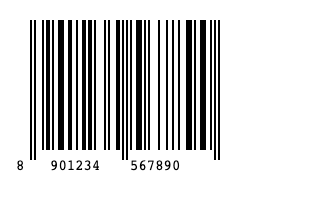
- The last digit changed. The 13th digit is a check digit, and a wrong one is replaced: in our test, 8901234567899 came out as 8901234567890. Print the number the tool shows.
- Bars too thin on the label. The PNG is 320 × 200 px with 2 px bars; print it at 100%, not shrunk. On label sheets the bulk generator warns when a bar would print thinner than 0.25 mm.
- “EAN-13 requires 12 or 13 digits”. EAN-13 and UPC-A carry digits only; make a SKU such as KURTI-042 a Code 128.
- Code 128 refuses your text. It takes letters, numbers and keyboard symbols; remove accents, non-English characters and emoji.
- Your designer wants a vector barcode. The barcode SVG wraps the PNG and blurs when scaled; the QR SVG is a true vector.
What the generator makes: a real output
We typed the tool's own placeholder, 890123456789, into EAN-13 and pressed Generate on 23 Oct 2026. It added the check digit 0 and returned this 320 × 200 px PNG. The number is a sample, not a registered GTIN; do not put it on a product.
Is this barcode generator free? Privacy and limits
Yes, it is free, and nothing is asked before the download: no sign-up, WhatsApp number or email. The code is drawn in your browser and the tool makes no network request, so the number you type is not sent to us (our tool code, read 22 Oct 2026). It makes one code at a time; a SKU list or Excel file goes to the bulk barcode generator (Code 128, Code 39, EAN-13, UPC-A). Shipping labels have an AWB label generator; more tools for marketplace sellers.
Listing these products on Meesho?
ListMagic, our AI listing agent, fills the Meesho catalog form for you: title, category, attributes, images and price. Free plan to start; Seller Pass ₹99 a month (StitchMagic pricing, checked 16 Oct 2026).
Try ListMagic