Meesho delivery partner: who carries the parcel
Meesho’s shipping partner collects the parcel from you and attempts delivery to the buyer; if delivery fails after three attempts, the parcel returns to you with no return shipping fee (Meesho pricing page, retrieved 4 October 2026).
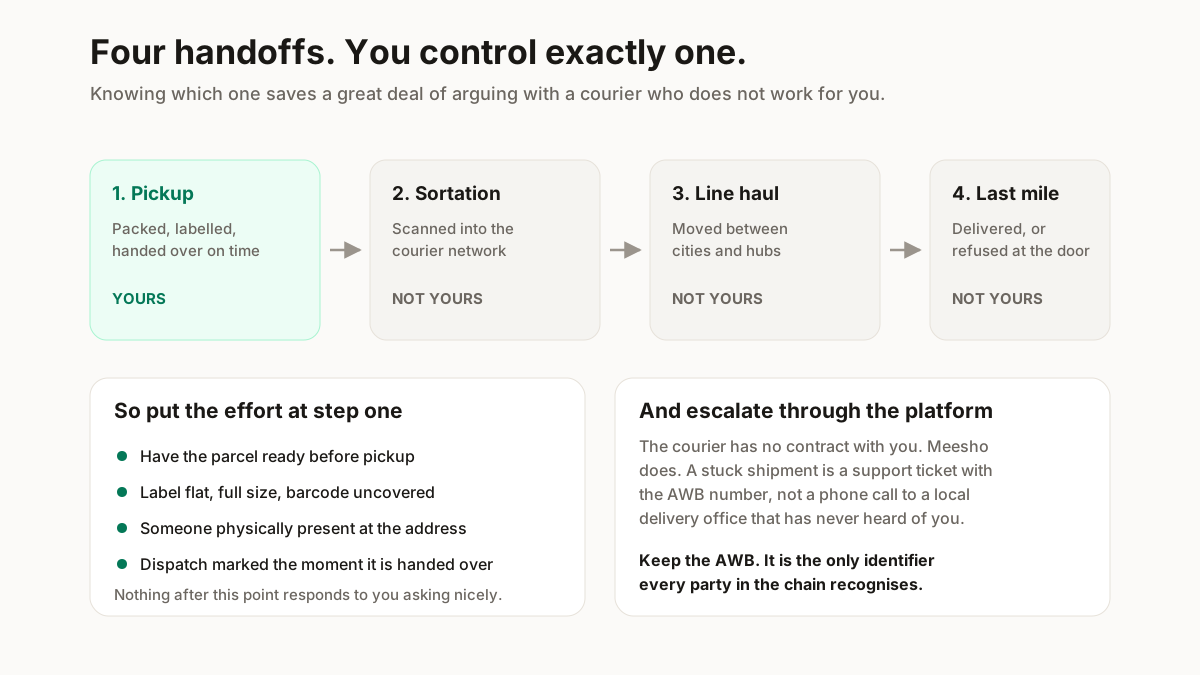
We could not find a Meesho page that names which courier handles an order, or a Supplier Panel setting for choosing one. Treat the partner as Meesho’s choice and put your effort into the pickup, which is yours.
A parcel stuck after pickup is between Meesho and its partner. Raise it in the Supplier Panel: Support, the Help tab for common issues, then “Raise a Ticket”, and follow it in “My Tickets” (Meesho support lesson, read 11 October 2026). Quote the order and the AWB number from the label in the ticket.
Meesho delivery partner jobs and the Valmo apps
This page cannot help with a delivery job, and we found no Meesho page that explains how to apply as a delivery partner. What we can report: on 3 October 2026 Meesho’s Google Play developer page listed three apps named “Valmo Partner”, “Valmo Pilot” and “Valmo Operations” beside the shopping app; on 11 October 2026 it listed only “Meesho: Online Shopping App”. Check that page for the current list rather than an app link from a third-party site.
Meesho pickup: the part you control
Have every parcel packed and labelled before the agent arrives, and the manifest printed. The same Meesho lesson gives 11 AM as the label cut-off for a same-day pickup(How to avoid common mistakes on Meesho, retrieved 4 October 2026). The rest is our recommendation:
- Someone at the pickup address. If your registered address is empty during the day, change it in the panel to one that is staffed.
- Label first thing, not while the agent waits. Print the batch in the morning, crop it to thermal size with the Meesho label crop tool, paste and stack. Rushing is how the wrong label ends up on the wrong bag.
- Count out against the manifest. A parcel with no handover record is hard to argue for later.
How to pack the parcel itself is in the Meesho parcel guide, and which bags and labels to stock in Meesho packing material.
Why a Meesho pickup fails
In our view the usual causes are an empty pickup address, a parcel marked ready but not packed, a label that will not scan, and a pickup address that differs from where the stock is. All four are on the supplier’s side, which means all four can be fixed.
A label that will not scan is usually a print problem: shrinking a label to fit an A4 sheet narrows the barcode bars. Print at the size the label was made for. Missed pickups can end in cancellations; Meesho’s pricing page says it “charges 0 penalties for supplier cancellations and auto cancellations”(retrieved 4 October 2026), but an older Meesho lesson still describes an auto-cancellation penalty, so check Payments, “Deductions and Compensations” after any missed pickup.
Cancelled or late orders also cost you the sale itself, and repeated returns cost more: the Meesho saree returns analysis covers why buyers send pieces back, and the Meesho seller hub links every Meesho guide.