How to add a watermark to multiple images
- Drop your photos into the box above, or tap it to choose them. Up to 50 go into one batch.
- Type your shop name under Your mark, or tap Use a logo instead and pick a PNG, SVG or JPG.
- Pick one of the nine Position squares, then set Size (5–40% of width) and Opacity (10–100%). The preview shows the first photo at full resolution.
- Leave Auto light/dark for each photo on, then tap Watermark … photos → ZIP.
The ZIP is called watermarked-photos.zip. Each photo keeps its width and height and its file name, with “-watermarked” added. For more than 50, run a second batch: the cap keeps the browser responsive, it is not a paywall. All our other photo tools are on the tools page.
Add a logo to photos in bulk
Upload the logo once and it goes on every photo in the batch, scaled to the same share of each photo’s width and keeping its own shape.
Use a PNG with a transparent background. A JPG logo carries its white box onto every photo. Around 1000 px wide keeps it sharp on large camera files.
Keep a white and a dark version. The automatic light/dark switch works on text marks only; a logo is drawn in its own colours, so a dark logo disappears on a black saree. Run dark products as a separate batch with the white logo.
No logo? Use text. A shop name and a WhatsApp number in plain type does the job, and that is what the tool starts with.
How to watermark photos so the mark survives a screenshot
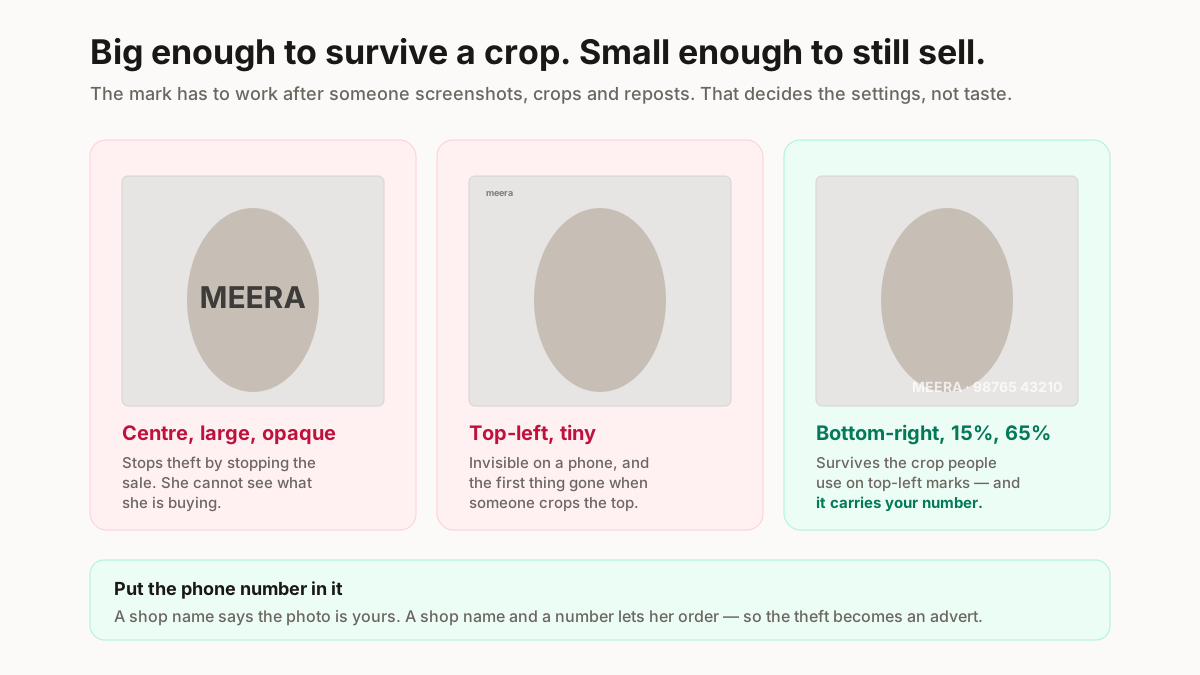
A watermark is there to stay on after someone screenshots, crops and reposts your photo. These are our recommendations, and the tool’s defaults sit inside them:
- Bottom-right, the same corner every time. It reads as branding, and it sits over the product less than a centre mark.
- 12–18% of the width. Much smaller is hard to read on a phone; much larger starts to cover the product.
- 60–70% opacity. Clearly there, without looking like a sticker.
- Put your number in it. A shop name says the photo is yours; a name and a number lets someone who sees a reposted copy order from you.
No watermark stops a determined copier. A corner mark can be cropped off, which is why size and corner matter more than style.
Can you use watermarked photos on a marketplace?
Usually not as the main product image. IndiaMART’s help page says images “must be free of any text i.e. watermark, logo” (IndiaMART help, updated 6 March 2025, read 18 Oct 2026). Fynd’s Myntra listing FAQ lists “text or watermark” among things not allowed (third-party integrator, read 18 Oct 2026). Meesho’s public seller pages state no image rules at all (our check, 4 Oct 2026). For Flipkart and Amazon, check the image guidelines in your seller panel before you upload a marked batch.
Watermarks belong on the channels you run yourself: Instagram, a WhatsApp catalogue, your own website, a PDF price list. Keep two exports from one shoot: clean photos for marketplaces, marked ones for everything else.
Will watermarking reduce photo quality?
The photo keeps its pixel size; nothing is scaled down. Each file is re-saved as a JPEG at quality 0.92, which adds a small amount of compression you will not see on screen. Transparent areas of a PNG do not survive a JPEG, so use photos, not cut-outs.
Watermark last. Resizing after watermarking rescales the mark and can soften it, and a background remover run afterwards will cut round your logo. So: clean up, resize with the image resizer, sharpen with the HD photo converter if needed, then watermark. Keep the unmarked originals; if a mark goes on the wrong set, the watermark remover only blends a box over it.
Listing these products on Meesho?
ListMagic fills the Meesho catalog form from one clean product photo, so you are not typing the title, category and attributes by hand. Free plan to start; Seller Pass ₹99 a month (StitchMagic pricing, checked 16 Oct 2026).