How to remove a watermark from an image
- Drop a photo into the box above, or tap it to choose one (JPG, PNG or WebP).
- Pick a fill: Blend from edges, Pixelate or Solid colour.
- Drag a box over the watermark with your mouse or finger. Leave a little margin round it.
- Tap Remove watermark and check the result.
- Tap Download JPG, or Try again to draw a different box.
One box per pass. For a second mark, download, drop the new file back in and repeat. More image tools are on the tools page.
Which fill should you pick?
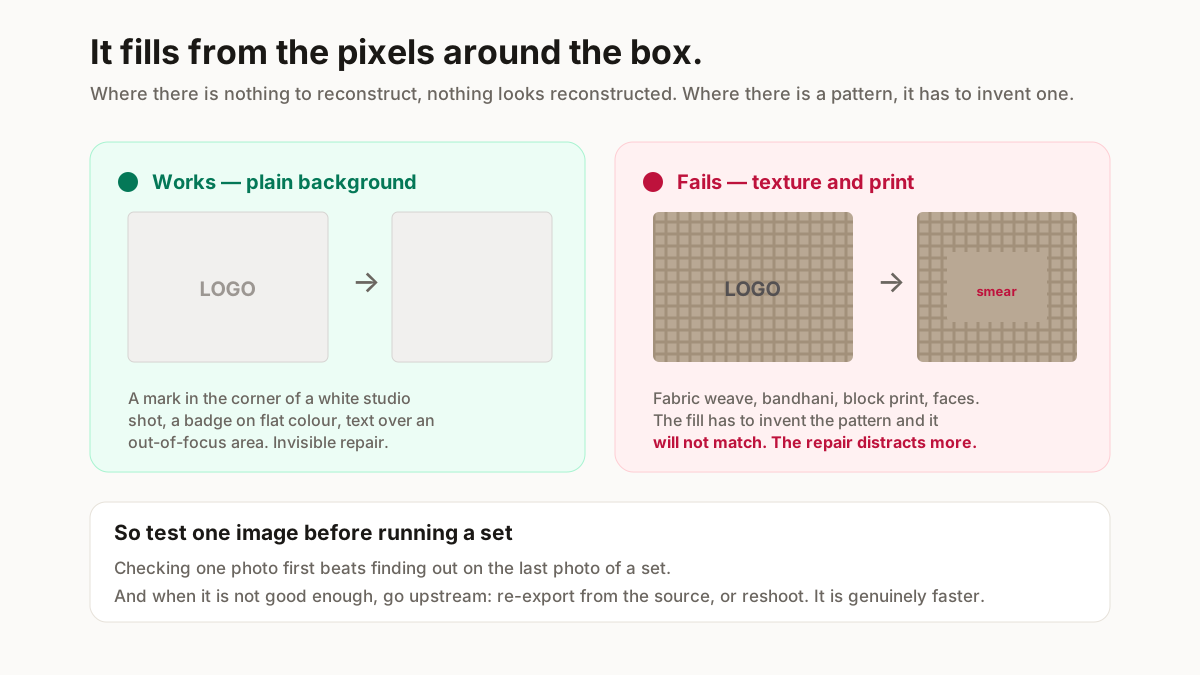
Blend from edges mixes the strip of pixels just above the box into the strip just below it. Use it for a mark on a plain wall, a white studio sheet, sky or an out-of-focus area. A box that starts and ends on plain background gives the cleanest blend; for a mark that touches the top or bottom edge of the photo, only the other side is used.
Pixelate turns the box into coarse blocks. It hides text and phone numbers rather than erasing them, so the area is still visibly edited.
Solid colour paints the box one colour you choose. On a pure white or single-colour background it is the cleanest result of the three.
Whatever you pick, the download is a JPG at the photo’s original width and height. A transparent PNG comes out on a solid background, so keep the original if you need transparency. To make the result lighter or a set size afterwards, use the image resizer; to sharpen a soft photo, the HD photo converter.
Can it remove a logo or text from a photo?
Yes, the same way: a logo, a date stamp, a phone number or a shop name is just another box. It works when the logo sits on something plain. A logo printed on the product itself, such as a brand on a T-shirt, sits over texture and folds, and the fill will show.
If the logo is yours and you need it on future photos instead of off them, the add watermark tool stamps a logo on a whole set at once.
Whose watermark can you legally remove?
Your own exports and images you own: the mark a design or editing app put on your file, or an old watermark of yours on a photo you shot.
It is not for a photographer’s mark on their photograph or a stock library’s mark on a preview. Those marks identify an unlicensed copy, and taking one off does not license the file. That is a licence breach and often a copyright one.
How do you remove a Canva watermark?
Not with a removal tool. Canva puts the watermark on premium elements in your design, not on the design itself. Its help page gives two paid routes: buy the element (from the download screen, or the “Remove watermarks” button on that element), or move to a Canva plan that includes premium content (Canva Help Centre, “watermarks on your design”, checked 18 Oct 2026).
The third route costs nothing: delete the premium element or swap it for a free one, then export again. Any of these gives a clean export at full quality; brushing the mark out afterwards gives a repaired image you are still not licensed to use.
How do you get the “Made with Gamma” badge off?
The badge is added when a Gamma deck is shared or exported, so you will not find it as an object in your slides. Whether your plan can export without it is set by Gamma, not by us: check Gamma’s own pricing and help pages before editing anything.
If you already have the export and the badge sits in a margin, cropping removes it with no repair at all. If it sits over a slide, export that slide as an image and use Solid colour when the slide background is one flat colour; on a photo or gradient the fill will show.
When will the repair look obviously wrong?
The fill has nothing to go on but the pixels round the box, so it cannot rebuild a pattern. A mark across a bandhani print, a block print, embroidery, hair or a face will come out smeared, and on a saree photo the repair can distract more than the mark did.
Test one photo before doing a set. When the result is not good enough, go upstream: re-export from the source file or reshoot. That is faster than fighting a fill, and the result is clean. Desktop editors with generative or content-aware fill reconstruct texture better than this tool does.
Cleaning product photos for a Meesho listing?
ListMagic fills the Meesho catalog form from one product photo, so you are not typing the title, category and attributes by hand. Free plan to start; Seller Pass ₹99 a month (StitchMagic pricing, checked 16 Oct 2026).