AI lehenga design: see your fabric as a finished lehenga
Upload a photo of lehenga fabric in the StitchMagic dashboard and the AI shows it stitched as a lehenga with choli on a model, ready to send to a bride before she commits to the fabric.
- Sign in; the dashboard opens Generate → Visualize with Lehengas selected.
- Upload a clear photo of the fabric, with the border and any embroidery in frame.
- Generate, then download the lehenga image or send it on WhatsApp.
There is no upload box on this page. The visualizer runs in your browser after sign-in, and each image uses credits from your account.
Lehenga AI: what it does and does not do
It does
- Show your fabric as a lehenga and choli on an AI model.
- Take one photo, or many in Bulk mode.
- In Bulk mode, use separate pieces for the choli, skirt and dupatta when you mark them.
It does not
- Put the lehenga on a photo of the bride herself.
- Add embroidery that is not in your fabric.
- Give free images: each one uses credits.
AI lehenga designs it draws from
Each image takes its design from one of the lehenga templates, from a bridal flared skirt with a full-sleeve choli to a mermaid-cut skirt with a corset blouse. Generate several from the same fabric to give the customer a choice; in Bulk mode a short design note steers it.
Skirt silhouettes
Flared, A-line, Circular, Mermaid-cut, Panelled, Tiered, Layered, Sequined, Printed silk
Choli necklines
Sweetheart, V-neck, Round, Boat, Square, High neck, Halter, Off-shoulder, One-shoulder, Shirt collar
From the StitchMagic lehenga design templates, checked 18 Oct 2026.
AI lehenga photo tips by fabric
- Velvet and raw silk: shoot in soft daylight; flash flattens the pile and the AI reads it as a flat colour.
- Net and organza: lay the fabric on a plain white sheet so the sheer weave and any sequins show.
- Embroidered and border fabric: keep the full border in frame; what the AI cannot see, it has to invent.
- Choli piece in the same photo: set it apart from the skirt fabric and, in Bulk mode, mark it as the blouse.
AI lehenga example (illustration)
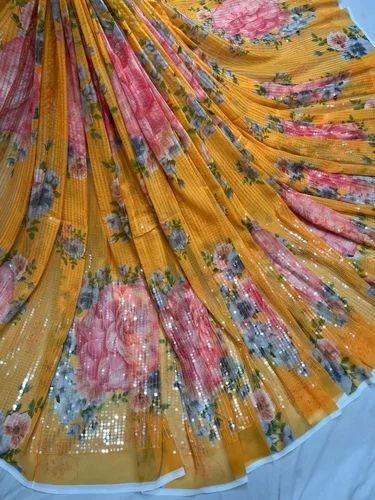
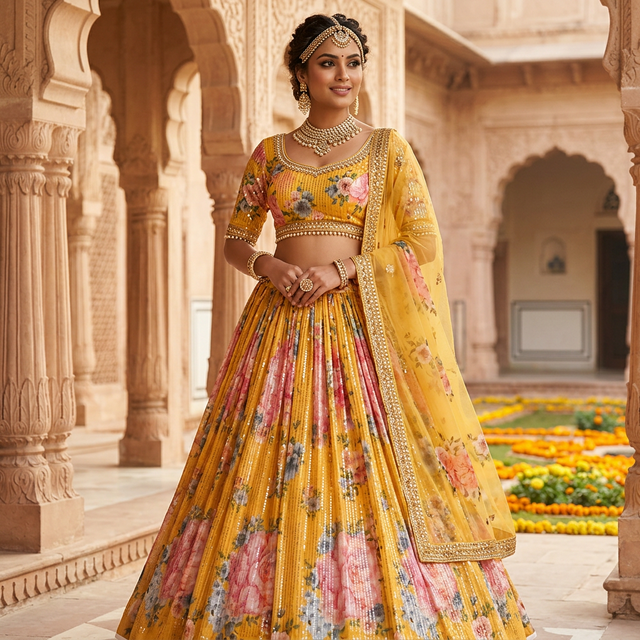
Illustration of the idea. It is not presented as an unedited output of the tool.
AI lehenga design FAQ
What is AI lehenga design?
You upload a photo of unstitched lehenga fabric and the AI generates that fabric as a finished lehenga with choli on a model, so a bride or customer sees the look before anything is cut.
Can I design my own lehenga online for free?
Not here. Each lehenga image uses credits from your StitchMagic account; your balance and top-up options are in the dashboard. There is no upload box on this page.
Can I choose the lehenga style?
The AI picks a design from the lehenga templates for each image, so generate a few to compare. In Bulk mode you can also type a short design note, such as “sleeveless choli, circular skirt”, to steer it.
Can I use separate fabric for the choli and dupatta?
Yes, in Bulk mode. If a photo shows more than one piece, mark which piece is the blouse, bottom or dupatta, or add a note such as “red folded fabric is blouse only”, and check the result.
Is the AI lehenga photo exact?
It is a preview, not a photograph of a stitched lehenga. Embroidery and borders are generated from what your photo shows, so compare each image with the real fabric before you send it.
Show the bride the lehenga before the fabric is cut.
More fabric visualization and lehenga tools
Listing finished lehengas on Meesho?
ListMagic fills the Meesho catalog form from one product photo, so each lehenga you sell is listed without typing every field. Free plan to start; Seller Pass ₹99 a month (StitchMagic pricing, checked 16 Oct 2026).